OpenWLC · Control launches on Friday 25 September
One controller. Every vendor.
OpenWLC is Optaro's own controller. It manages access points and switches over SSH, the interface your hardware already has, so it needs nothing from any vendor's cloud, licence server or agent. Cambium access points come first, when OpenWLC Control launches on Friday 25 September. Ruckus is in build now, and enterprise switches and access points follow: one system for the whole site, even when the kit is mixed.
OpenWLC is commercial software from Optaro. Open means open to any vendor's hardware, not open source.
The plan
Control first. Then Manage, then Optimise.
Control launches on Friday 25 September, at one price. Control puts a site on our own control plane, Manage makes it a day-to-day hospitality tool, and Optimise joins it to Optaro’s RF and assurance products.
- 1Phase 1 · launches on Friday 25 September
Control
Take control: one complete site, running through our own control plane.
Sites, AP adoption, WLANs, VLANs, manual channel and power, and verified configuration
20 capabilities · see the detail ↓ - 2Phase 2
Manage
Manage the estate: what hospitality networks need day to day.
RADIUS and ePSK, roaming, client visibility, Auto RF, power policies, alarms and backups
24 capabilities · see the detail ↓ - 3Phase 3
Optimise
Optimise the venue: a hospitality-focused alternative, not only a replacement controller.
Optaro Assure, RF Survey, venue optimisation, automation and reporting
21 capabilities · see the detail ↓
One price.Control, Manage and Optimise are phases of delivery, not tiers you pay more for, and a vendor is never an upgrade. There is one CloudWLC price, and each phase and each vendor arrives as part of it.
See pricingThe intelligence layer
CloudWLC controls the network. Optaro Assure understands it.
CloudWLC applies and verifies controller configuration. Assure brings the independent RF, roaming, client and service-path evidence that explains what the network is doing and whether a change actually helped.
Real, anonymised views from the Optaro Assure Wireless RF Audit
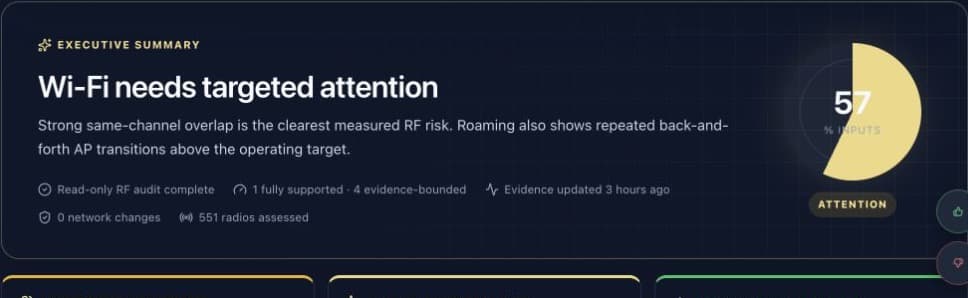
Executive diagnosis
A clear answer before the technical detail
Assure turns radio, roaming and service-path evidence into a customer-facing conclusion, with the evidence boundary and last observation shown alongside it.
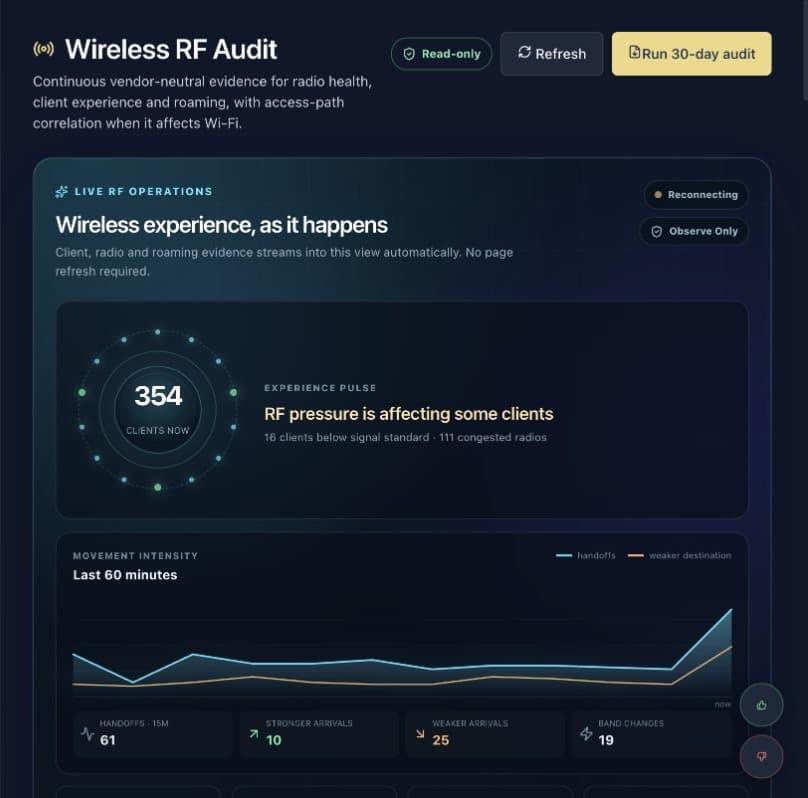
Live RF operations
Wireless experience as it happens
The live view follows client, radio and roaming evidence without a page refresh, so teams can see degradation and recovery rather than relying on a static controller snapshot.
Observe
Controller, radio, client, switch and service-path evidence in one model.
Understand
Separate RF faults from authentication, DHCP, DNS, VLAN, power and WAN failures.
Verify
Compare the experience before and after a controlled change, with rollback evidence.
Assure exists today. Its closed-loop CloudWLC integration arrives through the Optimise phase.
Feature matrix
Everything it does, phase by phase.
Control, Manage and Optimise build on each other, at one price. The gold marker shows the phase a capability arrives in.
65 capabilities across three phases. Each phase builds on the one before it. One price throughout. arrives in this phase included
| Capability | ControlPhase 1 | ManagePhase 2 | OptimisePhase 3 |
|---|---|---|---|
| Customer and estate management | |||
| Customer accounts, 2FA and tenant isolation | Arrives in Control | Included | Included |
| Multiple sites under each customer | Arrives in Control | Included | Included |
| AP discovery, reviewed adoption, release and re-adoption | Arrives in Control | Included | Included |
| AP inventory, model, firmware and online state | Arrives in Control | Included | Included |
| Import sites, APs and WLANs from Cambium Cloud | Arrives in Control | Included | Included |
| Guided controller cutover | Arrives in Control | Included | Included |
| AP-count tracking | Arrives in Control | Included | Included |
| WLAN management | |||
| Create, edit, enable and disable WLANs | Arrives in Control | Included | Included |
| Assign WLANs to whole sites | Arrives in Control | Included | Included |
| Open and WPA2-PSK security | Arrives in Control | Included | Included |
| VLAN assignment | Arrives in Control | Included | Included |
| 2.4 GHz, 5 GHz or both bands | Arrives in Control | Included | Included |
| Configuration version history | Arrives in Control | Included | Included |
| Device acknowledgement and verified readback | Arrives in Control | Included | Included |
| Roll back to the preceding configuration | Arrives in Control | Included | Included |
| Manual RF controls | |||
| Enable or disable a radio | Arrives in Control | Included | Included |
| Fixed channel | Arrives in Control | Included | Included |
| Channel width | Arrives in Control | Included | Included |
| Fixed transmit power | Arrives in Control | Included | Included |
| Site-wide defaults with per-AP overrides | Arrives in Control | Included | Included |
| WLAN and access control | |||
| WPA2/WPA3 Enterprise | – | Arrives in Manage | Included |
| External RADIUS | – | Arrives in Manage | Included |
| RADIUS accounting | – | Arrives in Manage | Included |
| Dynamic VLANs | – | Arrives in Manage | Included |
| RADIUS-driven ePSK | – | Arrives in Manage | Included |
| Client isolation | – | Arrives in Manage | Included |
| Captive portal integration | – | Arrives in Manage | Included |
| WLAN schedules | – | Arrives in Manage | Included |
| RF management | |||
| Permitted channel pools | – | Arrives in Manage | Included |
| Automatic channel selection | – | Arrives in Manage | Included |
| Minimum and maximum transmit-power policies | – | Arrives in Manage | Included |
| Automatic power management | – | Arrives in Manage | Included |
| 2.4 GHz radio reduction policies | – | Arrives in Manage | Included |
| Interference and utilisation awareness | – | Arrives in Manage | Included |
| Site-wide planning across access points from different vendors | – | Arrives in Manage | Included |
| Site-wide changes with canary APs and batch limits | – | Arrives in Manage | Included |
| Maintenance windows and protected venue zones | – | Arrives in Manage | Included |
| Operations | |||
| Client inventory and association history | – | Arrives in Manage | Included |
| AP and WLAN alarms | – | Arrives in Manage | Included |
| Configuration drift detection | – | Arrives in Manage | Included |
| Bulk changes | – | Arrives in Manage | Included |
| Audit history | – | Arrives in Manage | Included |
| Controller and configuration backups | – | Arrives in Manage | Included |
| Further vendors, models and firmware as each is tested | – | Arrives in Manage | Included |
| RF optimisation | |||
| RF Survey design and floor-plan integration | – | – | Arrives in Optimise |
| Compare intended and observed coverage | – | – | Arrives in Optimise |
| Venue-aware channel planning | – | – | Arrives in Optimise |
| Automated transmit-power balancing | – | – | Arrives in Optimise |
| Co-channel and adjacent-channel analysis | – | – | Arrives in Optimise |
| Event and occupancy-aware RF policies | – | – | Arrives in Optimise |
| Recommendation, approval and controlled automation modes | – | – | Arrives in Optimise |
| Optaro Assure integration | |||
| Guest journey and service-health correlation | – | – | Arrives in Optimise |
| Internet, DHCP, DNS, RADIUS and captive-portal checks | – | – | Arrives in Optimise |
| Root-cause analysis across AP, switch, gateway and WAN | – | – | Arrives in Optimise |
| Business-impact views by property, floor and service | – | – | Arrives in Optimise |
| Experience-based rollback | – | – | Arrives in Optimise |
| Proactive fault and degradation detection | – | – | Arrives in Optimise |
| Advanced operations | |||
| Firmware orchestration and compatibility rings | – | – | Arrives in Optimise |
| Configuration templates across hotel groups | – | – | Arrives in Optimise |
| Change simulation and impact previews | – | – | Arrives in Optimise |
| Cross-site benchmarking | – | – | Arrives in Optimise |
| SLA and service reports | – | – | Arrives in Optimise |
| Public API, webhooks and MSP integrations | – | – | Arrives in Optimise |
| Switch port, VLAN and PoE configuration | – | – | Arrives in Optimise |
| Dedicated and customer-hosted deployment options | – | – | Arrives in Optimise |
See it
From Cambium Cloud to your own controller, in under a minute.
The move, then day two: every access point, client and radio on one dashboard, new access points added whenever the estate grows.
- Cambium Cloud is closing. Your access points can stay.
- Pair once. Your password stays with Cambium.
- Read-only. Nothing changes on your network.
- Imported and verified before anything moves.
- Switch when you are ready. One site, or everything.
- Day two: every AP, client and radio on one dashboard.
- Add an access point whenever the estate grows.
- New SSID, live on every AP group in one go.
- And with Optaro Assure, the RF picture on top.
Why it matters
What lock-in actually costs you.
Cambium's own guidance says that if its cloud licensing service, the Cloud Anchor, goes away, cnMaestro On-Premises keeps running but “you will not be able to add or delete any devices.” That is true of any cnMaestro server, wherever it is hosted, including ours. It is the clearest example of a pattern every vendor shares: your network works for as long as somebody else's cloud, licence and balance sheet allow it. A failed access point you cannot replace is a network with an expiry date.
Cambium's guidance for cnMaestro Enterprise customersWorking today
On real Cambium hardware, OpenWLC already discovers an access point, takes over its management, registers it, reads its configuration, delivers changes and has them acknowledged, confirms the change on the device itself, and holds on to the access point through a reboot. No cnMaestro, no Anchor account and no Cambium login involved. Ruckus access points are being brought through the same steps now.
Reserve your place and tell us what you run. The estates people tell us about set the order we add vendors in.
Add devices again
Adopt new and replacement access points with no vendor cloud, licensing service or anchor account involved.
One system for the whole site
Access points and switches, whoever made them, in one inventory with one change history and one place to look.
Built for hospitality
Designed by the team that has deployed more than 10,000 access points in hotels and venues, around how those networks are actually run.
Hosted like everything else here
A dedicated controller, trusted HTTPS, automatic backups, managed updates and monitoring, in the same account as your other controllers.
Independent by design
Your network's future stops depending on one vendor's cloud, licensing or balance sheet.
Why we built it
Good hardware shouldn't have an expiry date.
Most hotels we walk into are running access points that work perfectly well, on a licence that costs more at every renewal, from a vendor that has quietly stopped caring about that model. Neither of those is a technical problem. They are commercial ones, and they are why OpenWLC exists. You paid for the hardware. You should be able to keep using it, at a price you can read off a page, without asking anyone's permission.
A price you can read
One published subscription, on our pricing page, whatever badge is on the access point. No quote, no negotiation, no renewal that arrives bigger than the last one.
Kit outlives the interest in it
An access point that still covers a corridor is still worth money. OpenWLC goes on managing models after the people who made them have moved on to selling the replacement.
Your estate, your decisions
Adding, replacing or retiring a device is a decision you make about equipment you own, not permission you buy back each year.
An OpenWLC you run yourself
Some properties cannot depend on anyone's cloud, including ours. A version of OpenWLC that runs on your own server is planned, for estates that want to decouple entirely. It is a subscription like the hosted service rather than a one-off purchase, and it has no date yet.
How it works
SSH, not somebody else's cloud.
Enterprise access points and switches already carry a management interface that answers to whoever owns the device: SSH. OpenWLC speaks it directly. There is no agent to install, no licence server to check in with and no vendor cloud in the path, so the hardware you bought keeps working for as long as it keeps working, and adding a device is a decision you make rather than one you are granted.
Nothing to install on the device
Your access points and switches run their own firmware, unmodified. OpenWLC connects to the interface they already expose.
No licence server in the path
Nothing has to phone a vendor before you can adopt, replace or remove a device.
One vendor added at a time, properly
Each vendor is read, written and verified on real hardware before it is published. We publish supported models and firmware as each is tested.
What it manages
What OpenWLC manages.
Cambium first, Ruckus next, and then every enterprise access point and switch that speaks SSH. Each one lands in the same controller, under the same account, on the same site.
Models and firmware are published as each is tested. Tell us what you run and we will confirm your estate.
- CambiumAccess points
Discovered, adopted and managed with no cnMaestro, Anchor account or Cambium login involved.
Launching on Friday 25 September - RuckusAccess points
Managed over the access point's own SSH interface, so an estate can move without a SmartZone or a cloud subscription.
In build now - Enterprise switchesSwitching and PoE
Ports, VLANs and PoE on the same site as the access points they power, so the wired and wireless halves stop being two jobs.
Next - More access pointsMixed estates
Any enterprise access point with an SSH interface is a candidate. Tell us what you run and it shapes the order we build in.
Next
Mixed estates
One radio plan for the whole site.
A hotel that has been refurbished twice has three generations of access point in it, often from different manufacturers. Every vendor's own controller can only see its own, so channels collide, power is set twice and nobody owns the result. OpenWLC sees the site, not the brand: channel, width, power and band are planned across every access point in the building, whoever made it.
- Channel and width planned across the whole site
- Transmit power balanced between neighbours from different vendors
- Band steering and 2.4 GHz policy applied once
- One inventory, one change history, one place to look
Site-wide RF automation arrives with the Manage and Optimise phases. Manual channel, width and power control is in Control from launch.
1Phase 1 · launches on Friday 25 September
OpenWLC Control
Take control: one complete site, running through our own control plane.
Everything needed to bring a site across from Cambium Cloud and run it: accounts, sites, adoption, WLANs, VLANs and manual radio control, with every change verified on the device.
Customer and estate management
- Customer accounts, 2FA and tenant isolation
- Multiple sites under each customer
- AP discovery, reviewed adoption, release and re-adoption
- AP inventory, model, firmware and online state
- Import sites, APs and WLANs from Cambium Cloud
- Guided controller cutover
- AP-count tracking
WLAN management
- Create, edit, enable and disable WLANs
- Assign WLANs to whole sites
- Open and WPA2-PSK security
- VLAN assignment
- 2.4 GHz, 5 GHz or both bands
- Configuration version history
- Device acknowledgement and verified readback
- Roll back to the preceding configuration
Manual RF controls
- Enable or disable a radio
- Fixed channel
- Channel width
- Fixed transmit power
- Site-wide defaults with per-AP overrides
2Phase 2
OpenWLC Manage
Manage the estate: what hospitality networks need day to day.
Enterprise security and RADIUS, automatic RF within limits you set, and the operational tools for running many access points safely: canaries, batches, maintenance windows, alarms and backups.
WLAN and access control
- WPA2/WPA3 Enterprise
- External RADIUS
- RADIUS accounting
- Dynamic VLANs
- RADIUS-driven ePSK
- Client isolation
- Captive portal integration
- WLAN schedules
RF management
- Permitted channel pools
- Automatic channel selection
- Minimum and maximum transmit-power policies
- Automatic power management
- 2.4 GHz radio reduction policies
- Interference and utilisation awareness
- Site-wide planning across access points from different vendors
- Site-wide changes with canary APs and batch limits
- Maintenance windows and protected venue zones
Operations
- Client inventory and association history
- AP and WLAN alarms
- Configuration drift detection
- Bulk changes
- Audit history
- Controller and configuration backups
- Further vendors, models and firmware as each is tested
3Phase 3
OpenWLC Optimise
Optimise the venue: a hospitality-focused alternative, not only a replacement controller.
The controller joined to Optaro Assure and RF Survey: radio planning against the building, service health from the guest's point of view, and automation you approve before it acts.
RF optimisation
- RF Survey design and floor-plan integration
- Compare intended and observed coverage
- Venue-aware channel planning
- Automated transmit-power balancing
- Co-channel and adjacent-channel analysis
- Event and occupancy-aware RF policies
- Recommendation, approval and controlled automation modes
Optaro Assure integration
- Guest journey and service-health correlation
- Internet, DHCP, DNS, RADIUS and captive-portal checks
- Root-cause analysis across AP, switch, gateway and WAN
- Business-impact views by property, floor and service
- Experience-based rollback
- Proactive fault and degradation detection
Advanced operations
- Firmware orchestration and compatibility rings
- Configuration templates across hotel groups
- Change simulation and impact previews
- Cross-site benchmarking
- SLA and service reports
- Public API, webhooks and MSP integrations
- Switch port, VLAN and PoE configuration
- Dedicated and customer-hosted deployment options
In the meantime
Don’t wait. Get your estate safe first.
Sign up now, while Cambium’s cloud is still running and your estate can be collected. Hosted cnMaestro and OpenWLC live in the same CloudWLC account, so you choose what suits each site.
| For Cambium access points | Hosted cnMaestro on CloudWLC | OpenWLC |
|---|---|---|
| Availability | Opens with the portal | Control launches on Friday 25 September; Manage and Optimise follow |
| Keep your existing Cambium access points | Yes | Yes |
| Add, replace and remove devices | While Cambium's licensing service runs | Yes. No licence server involved |
| Depends on Cambium's cloud or Anchor | For adding and removing devices | No |
| Who develops the controller | Cambium Networks (in administration) | Optaro |
| Manages other vendors' hardware | No, Cambium only | Built for it. Cambium first, Ruckus in build, switches next |
| One radio plan across mixed access points | Yes, the site rather than the brand | |
| Hosted, backed up and monitored for you | Yes | Yes |
| Same CloudWLC account and dashboard | Yes | Yes |
Questions
Straight answers.
CloudWLC is an independent service from Optaro. It is not affiliated with, endorsed by or operated by Cambium Networks, HPE Aruba Networking, RUCKUS Networks, Ubiquiti or any other equipment vendor.
What is OpenWLC?
Optaro's own controller. It manages access points and switches over SSH, the interface the hardware already has, rather than through a vendor's cloud or licence server. Cambium access points are the first it supports and Ruckus is in build now. It is hosted and operated for you on CloudWLC in the same way as our other controllers.
Why is it called OpenWLC?
Because it is open about which hardware it will manage, not tied to one manufacturer. It is a commercial product from Optaro, not an open-source project: the name is about your network being free of vendor lock-in, not about the source code.
How can it manage hardware Optaro does not make?
Every enterprise access point and switch carries a management interface that answers to whoever owns the device, and on this class of hardware that is SSH. OpenWLC uses it directly. Nothing is installed on your devices, their firmware is unmodified, and no vendor cloud sits in the path.
Which vendors does it manage?
Cambium access points from launch. Ruckus access points are in development now, over the access point's own SSH interface. Enterprise switches and further access point vendors follow. We publish supported models and firmware as each is tested rather than promising a list in advance, and the estates customers tell us about set the order we build in.
Can it really manage a site with access points from different manufacturers?
That is what it is built for. A hotel refurbished twice has two or three generations of hardware in it, and each vendor's own controller can only see its own, so channels collide and nobody owns the radio plan. OpenWLC treats the site as the unit: one inventory, one change history, and channel, width, power and band planned across every access point in the building. Site-wide RF automation arrives with the Manage and Optimise phases; manual channel, width and power control is there from launch.
Does it manage switches too?
That is next. Ports, VLANs and PoE belong on the same site as the access points they power, so the wired and wireless halves stop being two separate jobs. Access points come first.
When does it launch?
OpenWLC Control launches on Friday 25 September, alongside the CloudWLC portal. Manage and Optimise follow.
Do the Manage and Optimise phases cost more?
No. There is one CloudWLC price. Control, Manage and Optimise are the phases the controller is delivered in, not tiers you pay more for, so each phase arrives as part of what you already pay.
What is in Phase 1?
OpenWLC Control: customer accounts with 2FA and tenant isolation, multiple sites, reviewed AP adoption, inventory, import from Cambium Cloud and a guided cutover; creating, editing and assigning WLANs with open or WPA2-PSK security and VLANs; manual radio control of channel, width and power; and configuration history with verified readback and rollback. Enterprise security, RADIUS and automatic RF arrive in the Manage phase.
Which access points does it support today?
Cambium enterprise Wi-Fi access points. Tell us the models you run when you reserve your place and we will confirm your estate before launch day.
Why does adding devices matter so much?
Cambium's guidance is that without its cloud licensing service, a cnMaestro On-Premises server cannot add or remove devices. That applies to every cnMaestro server, wherever it runs. OpenWLC does not use that service at all, so replacing a failed access point or expanding a site stays possible. The same principle applies to every vendor we add: nothing has to ask permission before you can use hardware you own.
Should I wait for it instead of moving now?
No. Sign up now. Getting your estate collected and onto CloudWLC while Cambium's cloud is still running is the safe first step, and it puts you in the right place for OpenWLC the day it launches.
Is it connected to Cambium, Ruckus or any other vendor?
No. OpenWLC is an independent product from Optaro. It is not affiliated with, endorsed by or developed with Cambium Networks, RUCKUS Networks or any other equipment vendor. Their names appear here only to describe which hardware it manages.
Be first onto OpenWLC.
Reserve your place, and tell us what you run. The estates people tell us about set the order we add vendors in.
30-day money-back guarantee · No server to install